Most beginners think:
“JavaScript changes HTML using code like document.getElementById()… done.”But that’s only the surface.
The truth is:
JavaScript never directly changes HTML
It works through something called the DOM (Document Object Model)
And once you understand this deeply, your frontend skills level up instantly.
What is the DOM?
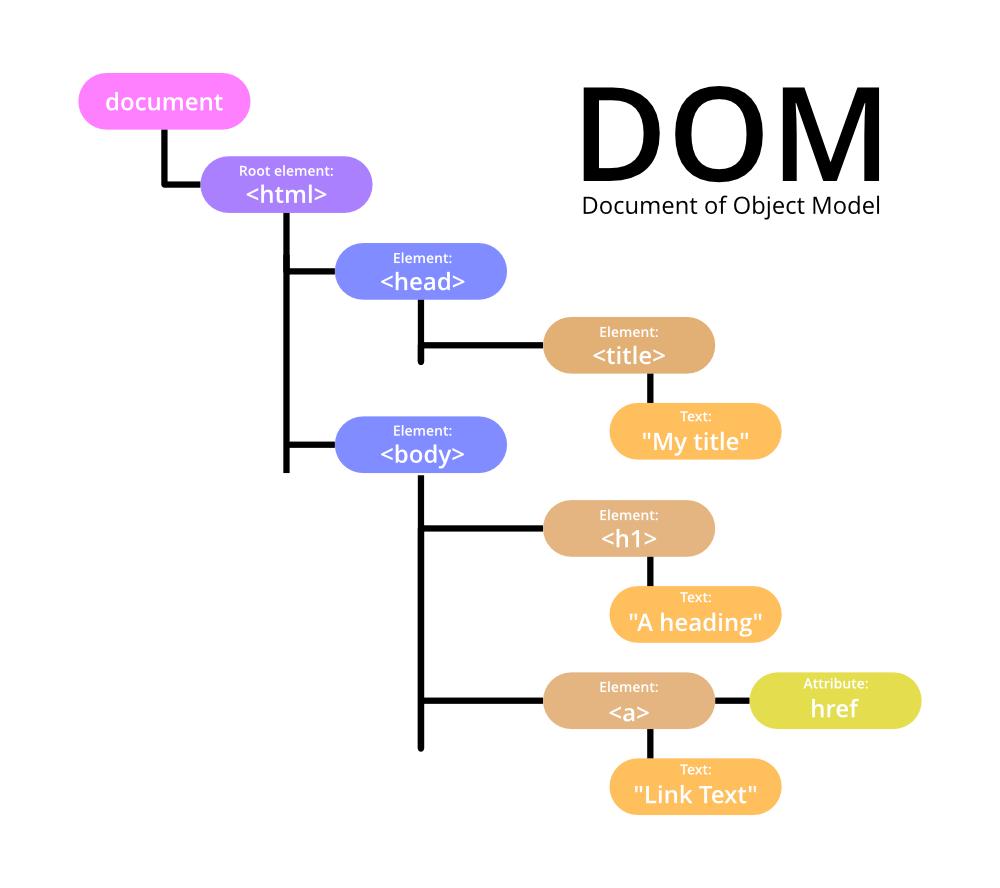
The DOM (Document Object Model) is a tree-like representation of your HTML document.
When a browser loads a webpage:
It reads the HTML
Converts it into a structured tree
Creates objects for every element
This structure is called the DOM
Example HTML:
<html>
  <body>
    <h1>Hello</h1>
    <p>Welcome</p>
  </body>
</html>
DOM Representation:
Document
 └── html
     └── body
         ├── h1 → "Hello"
         └── p  → "Welcome"
Each element becomes a node (object)
JavaScript interacts with these nodes
Why Do We Need the DOM API?
Now think logically:
HTML is just text
JavaScript is a programming language
How will JavaScript “talk” to HTML?
Answer: DOM API
What is DOM API?
The DOM API is a set of methods provided by the browser that allows JavaScript to:
Access HTML elements
Modify content
Change styles
Add/remove elements
Handle events
It acts like a bridge between JavaScript and HTML
How JavaScript Uses DOM API
Let’s break it into real steps
1. Selecting Elements
JavaScript first finds elements inside the DOM:
const heading = document.getElementById("title");
document= root of DOMgetElementById= DOM API method
2. Modifying Content
heading.textContent = "Hello Ravi";This updates the text node inside the DOM
3. Changing HTML
heading.innerHTML = "<span>New Text</span>";DOM is updated → Browser re-renders UI
4. Changing Styles
heading.style.color = "red";Direct manipulation of CSS via DOM
5. Creating New Elements
const div = document.createElement("div");
div.textContent = "New Element";
document.body.appendChild(div);
JavaScript:
Creates node
Inserts into DOM tree
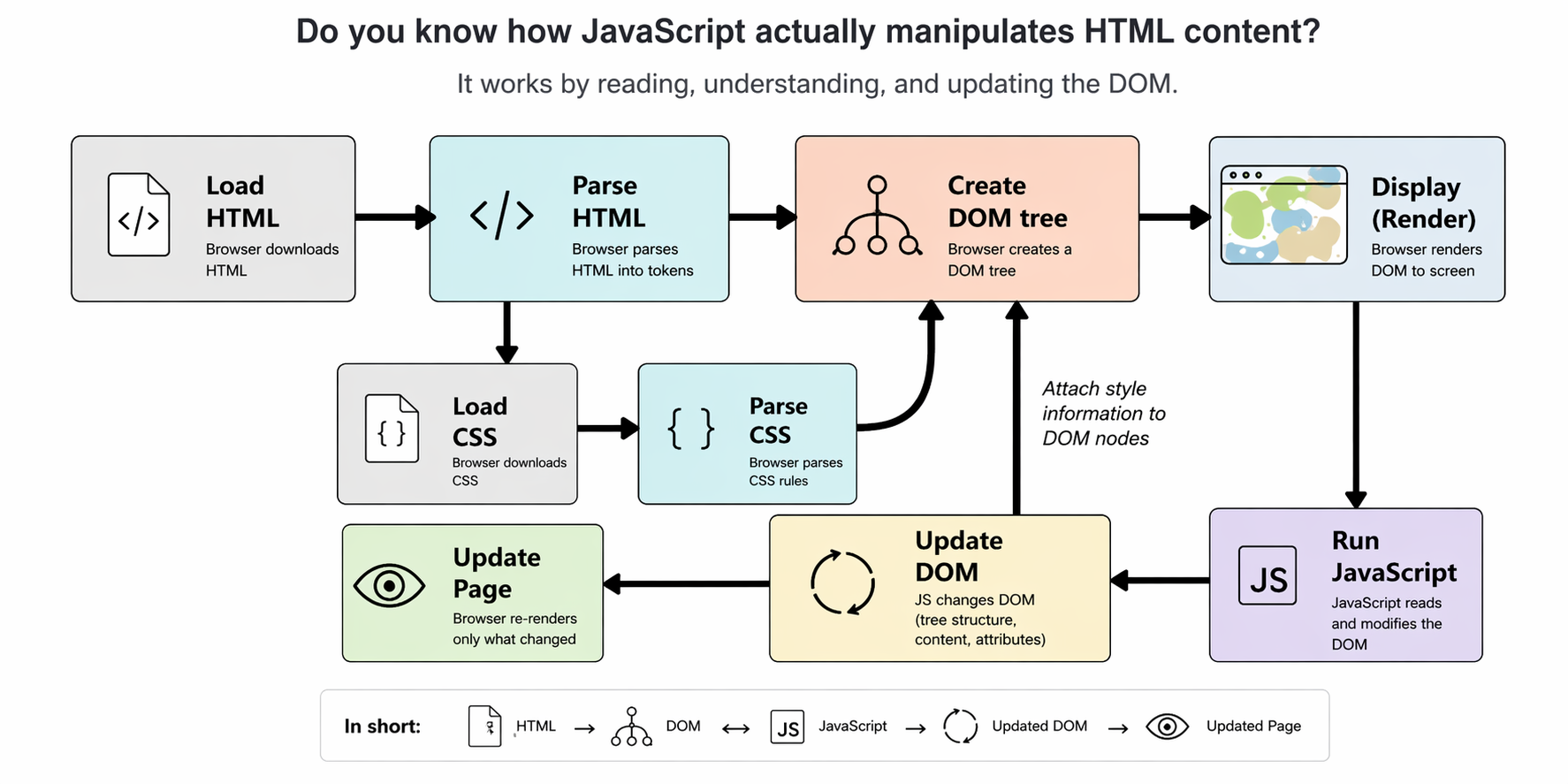
Flow:
HTML → Converted to DOM
JavaScript → Uses DOM API
DOM gets updated
Browser:
Recalculates layout (Reflow)
Repaints screen
That’s how changes appear visually
Reflow vs Repaint
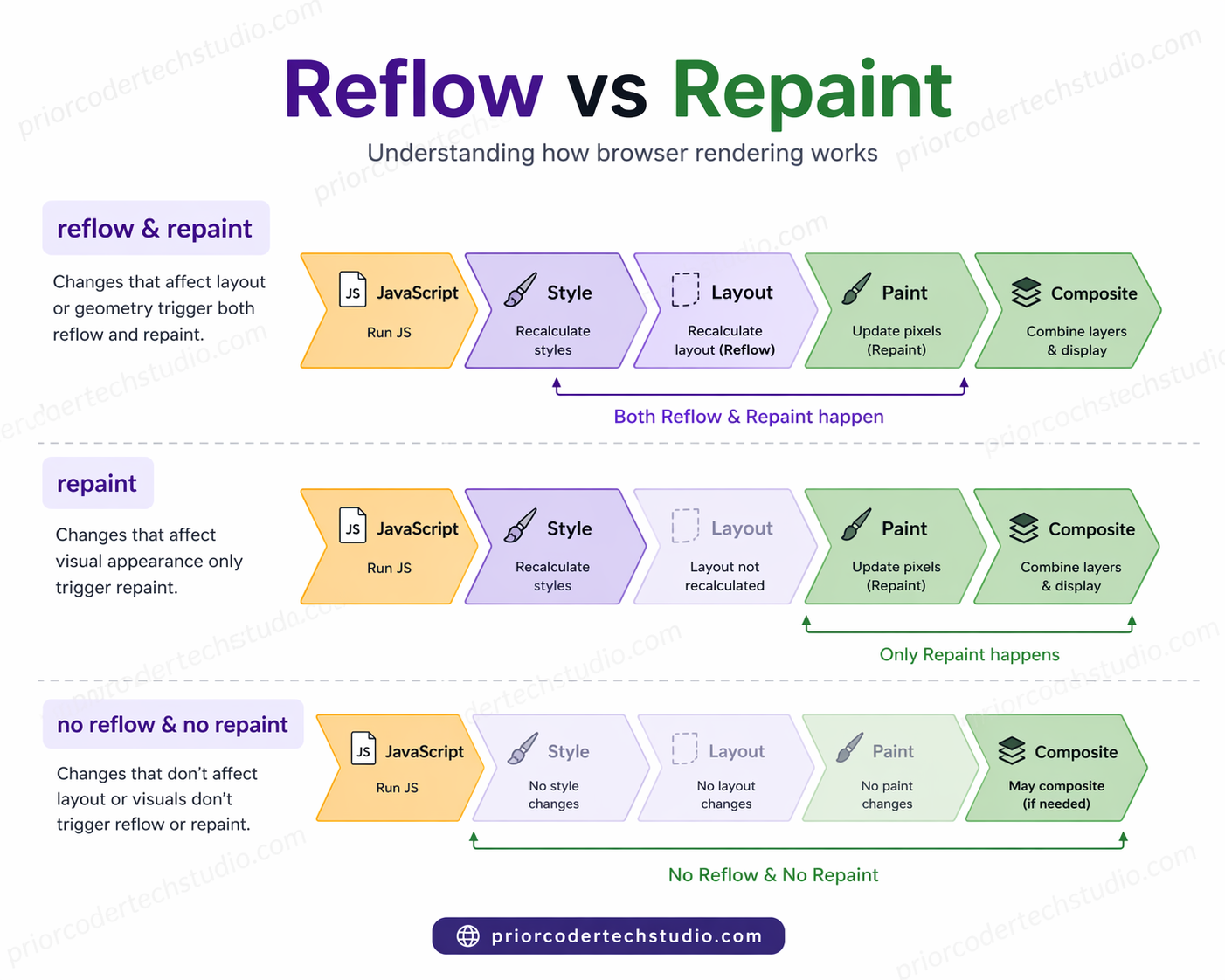
When JavaScript updates the page through the DOM, the browser doesn’t just “show it.”
It runs a rendering pipeline—and two important steps in that pipeline are:
Reflow (Layout)
Repaint (Paint)
What is Reflow (Layout)?
Reflow happens when the browser needs to recalculate the layout of elements.
In simple words:
How big is each element and where should it be placed?
What triggers Reflow?
Changing size (
width,height)Changing position (
top,left,margin)Adding/removing elements
Changing font size
Resizing window
Example
const box = document.getElementById("box");
box.style.width = "300px";
Browser must:
Recalculate layout
Adjust surrounding elements
That’s Reflow
Important Point
Reflow is expensive because:
It affects other elements too
Can trigger chain reactions in layout
What is Repaint?
Repaint happens when the browser updates visual appearance only, without changing layout.
In simple words:
How should it look?
What triggers Repaint?
Changing color (
color,background)Visibility (
visibility)Shadows (
box-shadow)Outline
Example
box.style.color = "red";No layout change
Only visual update
That’s Repaint
Important Insight
Every Reflow triggers a Repaint
But Repaint does NOT trigger Reflow
Example
box.style.width = "300px";   // Reflow + Repaint
box.style.color = "blue";    // Repaint only
Performance Impact
If you write code like this:
for (let i = 0; i < 1000; i++) {
  box.style.width = i + "px";
}
You cause 1000 reflows
This can freeze UI
Important Deep Concepts
1. JavaScript Does NOT Touch HTML Directly
It modifies DOM objects, not raw HTML text
2. DOM is Live and Dynamic
Changes reflect immediately in UI
3. Reflow & Repaint (Performance Impact)
Every DOM change can:
Trigger layout calculation
Affect performance
That’s why:
Avoid unnecessary DOM updates
Batch changes when possible
4. Virtual DOM (Modern Frameworks)
Libraries like React don’t update DOM directly.
They use:
Virtual DOM
Efficient diffing