Modern applications generate enormous amounts of data every second.
Examples include:
Stock market price updates
Food delivery tracking
Online payments
Social media notifications
IoT sensor readings
Banking transactions
Gaming leaderboards
A large application can generate millions of events per second.
The biggest challenge is:
How can systems process all this information in real time without slowing down or crashing?
This is where technologies like Apache Kafka and stream processing become extremely important.
What Is an Event?
An event means something that happened inside a system.
Examples:
Event | Description |
|---|---|
User Login | User signed into application |
Payment Success | ₹1000 transaction completed |
Order Placed | Customer purchased product |
Stock Tick | Share price changed |
Sensor Reading | Temperature updated |
Chat Message | New message received |
Why Traditional Systems Struggle
Imagine an e-commerce website.
When a user places an order:
Save order to database
Send confirmation email
Update inventory
Notify warehouse
Update analytics dashboard
Trigger recommendation engine
In a traditional architecture:
The backend tries to do everything immediately.
Problems start appearing:
Slow responses
Server overload
High latency
Difficult scaling
Risk of crashes
When traffic increases massively, this approach becomes difficult to maintain.
Real-Time Systems and Scalability
Real-time systems are designed to process events instantly or within milliseconds.
These systems often have strict timing requirements and must handle continuous streams of incoming data.
Examples:
Stock trading platforms
Ride-sharing apps
Banking fraud detection
Live sports analytics
AI recommendation systems
To handle this scale efficiently, systems use:
Event streams
Queues
Distributed processing
Stream processing engines
Batching techniques
What Is Apache Kafka?
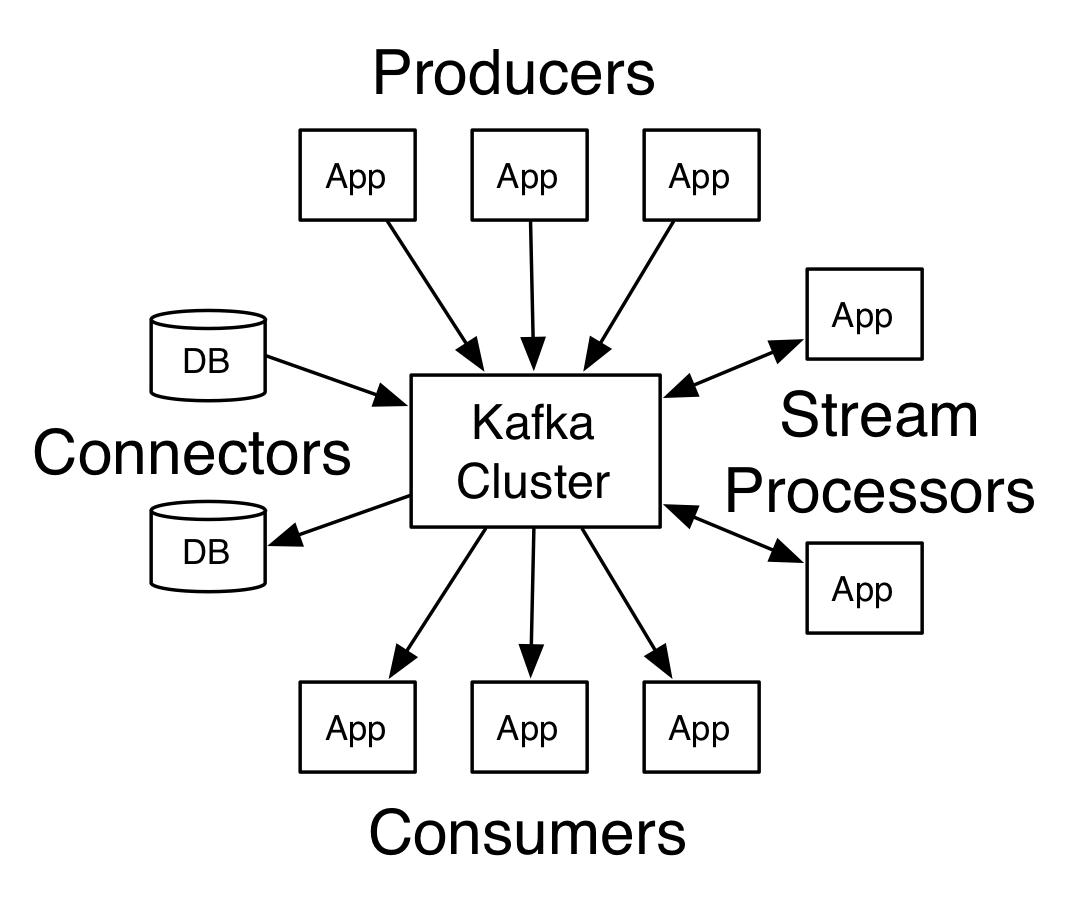
Apache Kafka is a distributed event streaming platform designed to process large volumes of real-time data.
Kafka works like a giant event pipeline.
Applications send events into Kafka, and multiple systems can consume those events independently.
Simple Kafka Architecture
Example:
Instead of one server doing everything, Kafka distributes the workload.
Understanding Event Streams
An event stream is a continuous flow of events generated over time.
Examples of event streams:
User clicks
GPS location updates
Stock market prices
Sensor readings
Social media activity
Imagine a social media app:
Every:
Like
Comment
Share
Follow
becomes an event in a stream.
Kafka helps process these streams efficiently in real time.
Core Kafka Concepts
1. Producer
A producer sends events to Kafka.
Examples:
Mobile application
Payment gateway
IoT device
Backend API
Example Producer Event
{
  "user": "Ravi",
  "action": "BUY",
  "amount": 2500
}
2. Topic
A topic is a category of events.
Examples:
Events related to orders go into the orders topic.
3. Consumer
Consumers read events from Kafka.
Examples:
Analytics systems
Notification services
AI models
Fraud detection systems
4. Broker
Kafka servers are called brokers.
A Kafka cluster can contain multiple brokers:
This enables high scalability and fault tolerance.
Why Kafka Is So Fast
Kafka is designed for:
High throughput
Distributed processing
Low latency
Fault tolerance
Horizontal scaling
One major reason Kafka performs so well is partitioning.
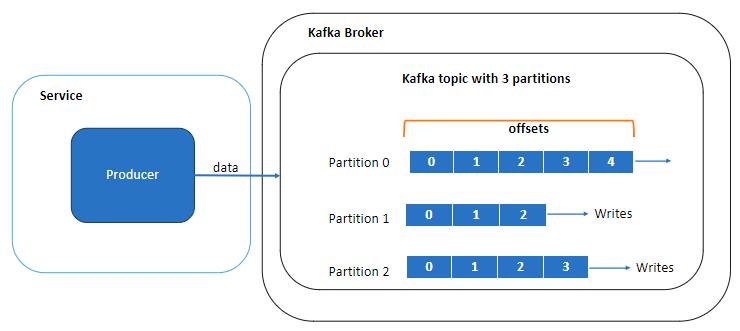
What Are Partitions?
Kafka splits topics into partitions.
Example:
Now multiple consumers can process events simultaneously.
This allows parallel processing.
Kafka Partition Diagram
Example: Processing 10 Million Events
Without partitions:
This becomes slow.
With partitions:
Now the system scales efficiently.
Kafka can process millions of events because workload is distributed across multiple machines.
What Is Stream Processing?
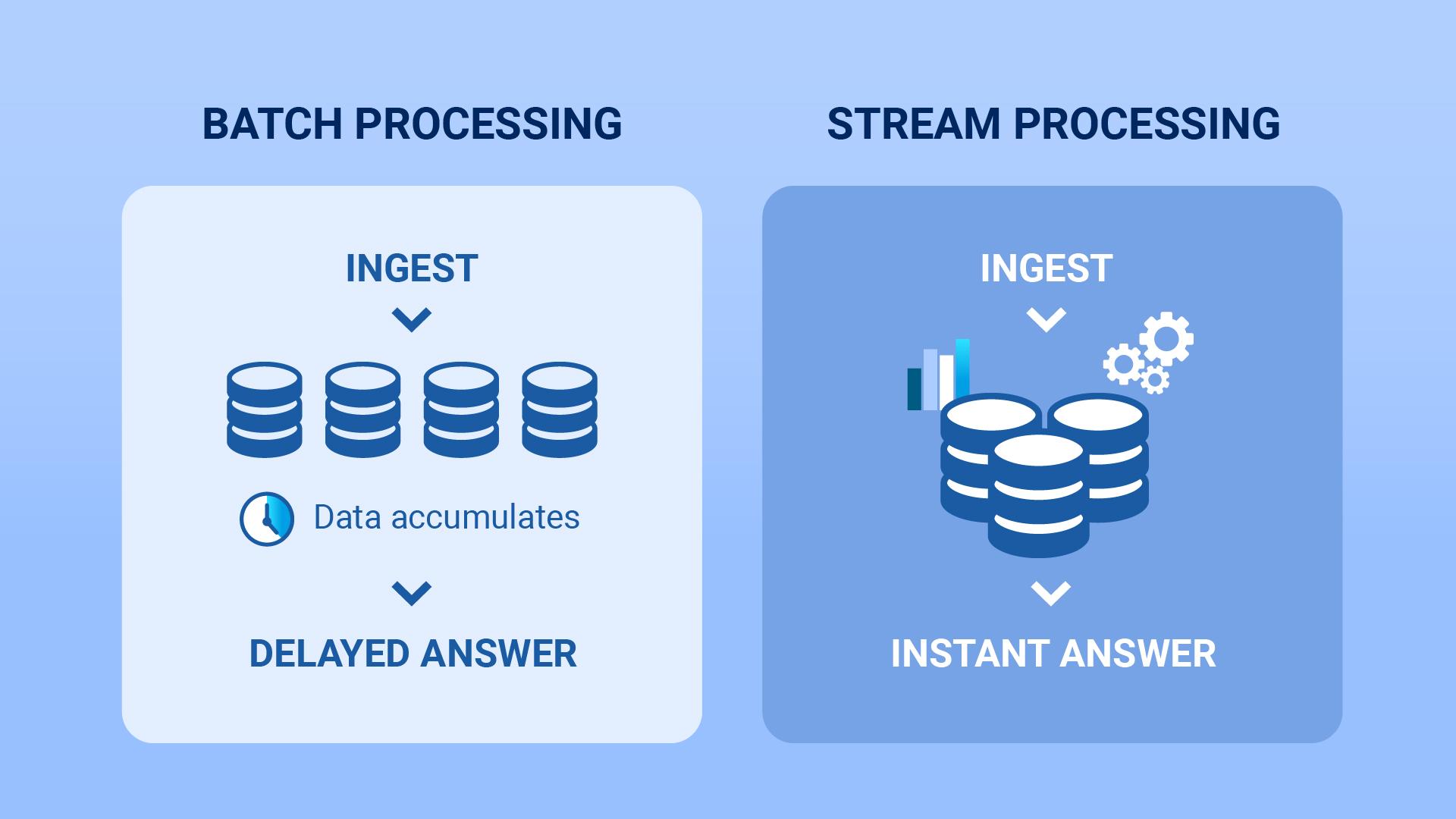
Traditional systems often process data in batches.
Example:
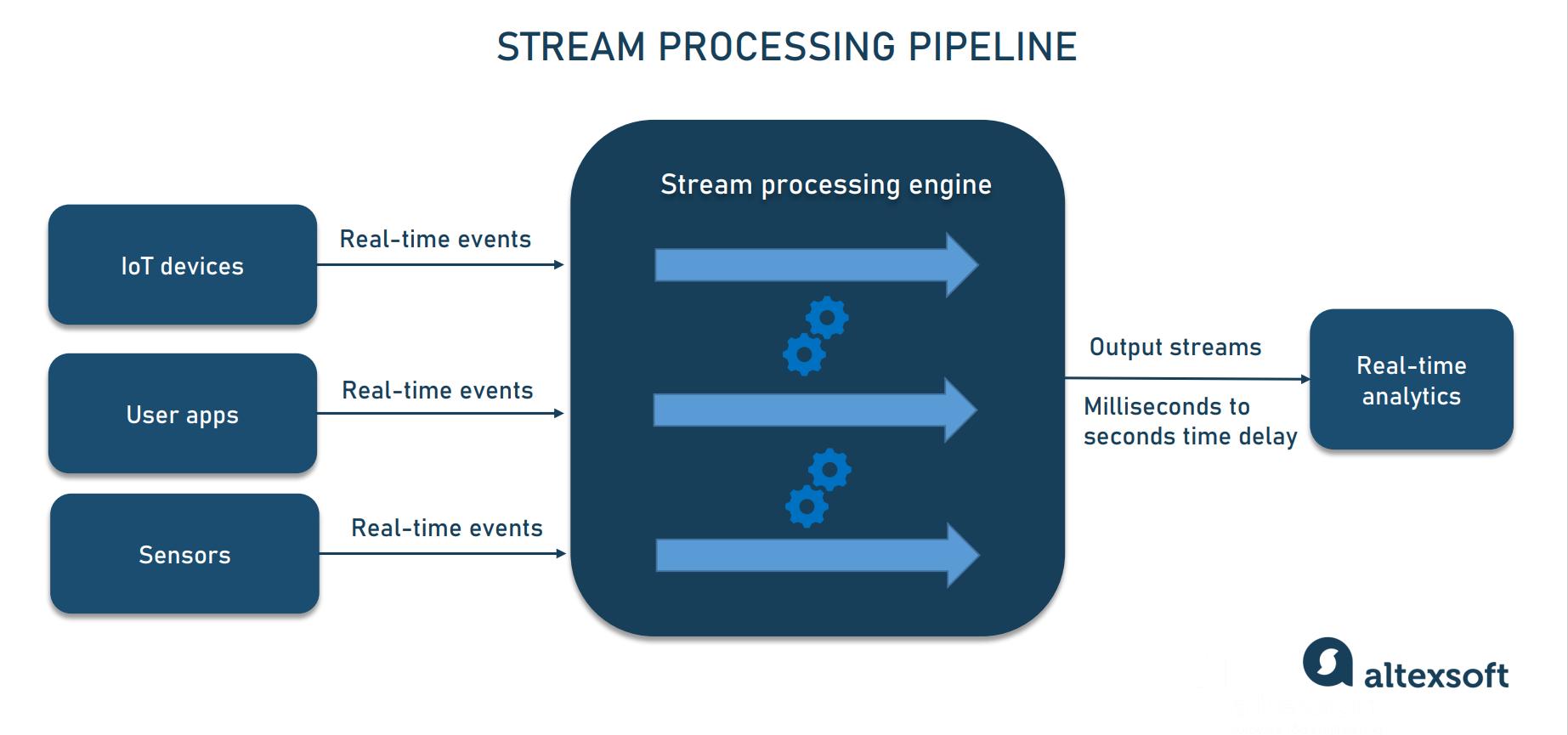
Stream processing handles events immediately as they arrive.
Example:
This is critical for real-time applications.
Stream Processing Analogy
Imagine water flowing through pipes continuously.
Instead of storing all water first and processing later, the system processes it continuously.
That is stream processing.
Stream Processing Engines
Popular stream processing tools include:
Tool | Purpose |
|---|---|
Apache Flink | Real-time stream processing |
Apache Spark | Batch + streaming analytics |
Kafka Streams | Lightweight Kafka processing |
Apache Storm | Distributed stream computation |
These systems process incoming events in real time.
Real-Time Fraud Detection Example
Imagine a bank receives this event:
{
  "user": "Ravi",
  "amount": 95000,
  "country": "Unknown"
}
A stream processing engine instantly checks:
Is amount unusual?
Is country suspicious?
Are there too many recent transactions?
If suspicious:
All this can happen within milliseconds.
Stream Processing Visualization
Importance of Queues in Real-Time Systems
Queues are extremely important in scalable systems.
A queue acts as a buffer between producers and consumers.
Instead of processing everything instantly:
Benefits:
Prevents overload
Smooth traffic handling
Improves reliability
Enables asynchronous processing
Kafka topics work similarly to distributed queues.
Example: Food Delivery System
Imagine 1 million users placing orders during dinner time.
Without queues:
With Kafka:
Consumers process them continuously without crashing the system.
Batching for Better Performance
Batching means grouping multiple events together before processing.
Instead of:
The system processes:
This reduces:
Network calls
Database operations
CPU overhead
Batching is one reason Kafka achieves very high performance.
Batching Visualization
Kafka Consumer Groups
Consumer groups allow multiple consumers to work together.
Example:
Kafka distributes partitions among consumers automatically.
This enables massive scalability.
Kafka Retention
Kafka stores events for a configurable period.
Example:
Event Replay Example
Suppose analytics service crashes.
When restarted:
No important data is lost.
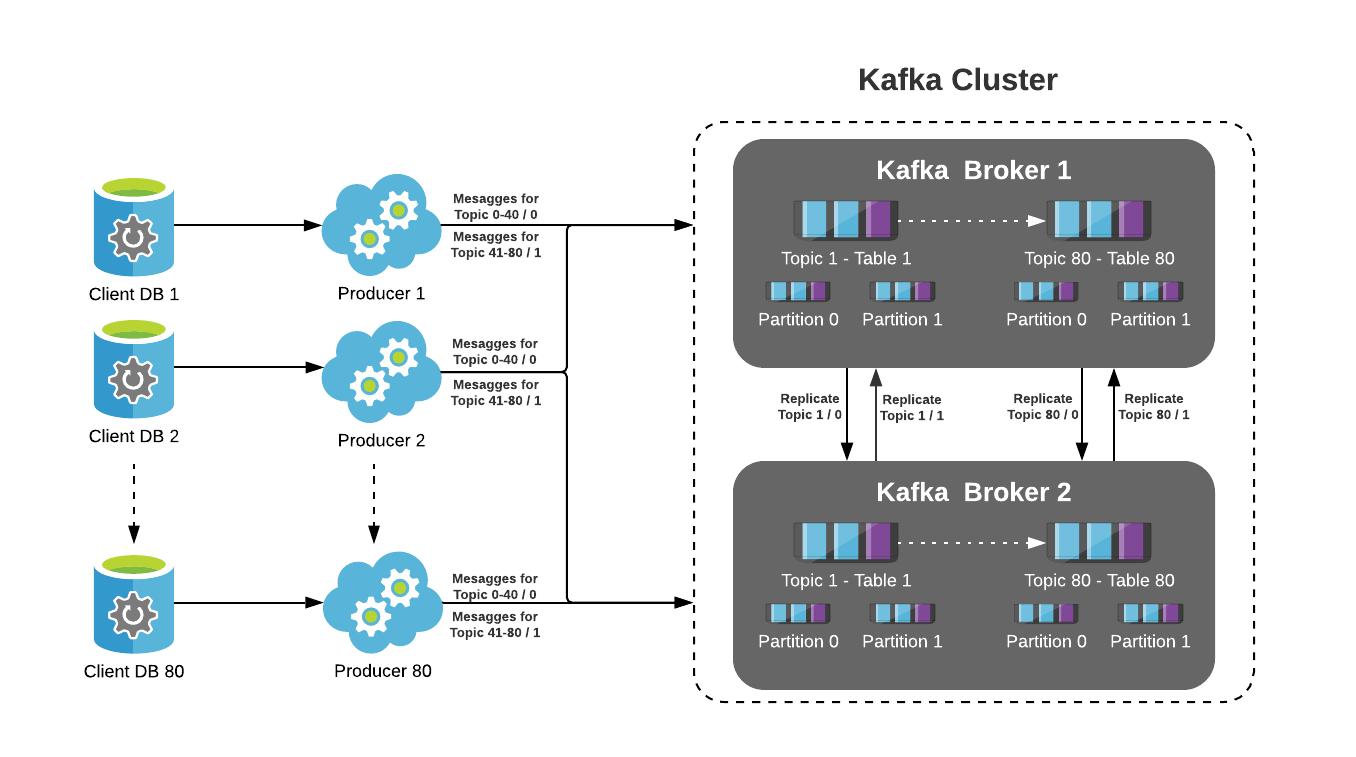
Kafka Replication and Fault Tolerance
Kafka replicates data across brokers.
If one broker fails:
This provides high availability and reliability.
Kafka Replication Visualization
Example: Stock Market System
Stock trading systems generate enormous real-time data.
Example event:
{
  "symbol": "NIFTY",
  "price": 24850,
  "volume": 15000
}
Kafka streams this data to:
Trading dashboards
AI prediction systems
Alert engines
Strategy processors
Historical storage
all at the same time.
This is why Kafka is heavily used in financial systems.
Real-World Companies Using Kafka
Many large companies use Kafka for scalable systems:
Company | Usage |
|---|---|
Netflix | Streaming analytics |
Uber | Trip tracking |
Activity streams | |
Amazon | Order pipelines |
Airbnb | Real-time event systems |
Kafka was originally developed at LinkedIn.
Challenges in Stream Processing
Even advanced systems face challenges.
1. Duplicate Events
Sometimes the same event arrives twice.
Solution:
2. Late Events
Network delays can cause events to arrive late.
Stream processing frameworks use techniques like:
Watermarks
Time windows
to handle this properly.
3. Scaling Problems
Millions of events require:
Proper partitioning
Efficient batching
Monitoring
Load balancing
Monitoring Kafka Systems
Popular monitoring tools include:
Tool | Purpose |
|---|---|
Prometheus | Metrics collection |
Grafana | Dashboards |
Confluent Control Center | Kafka management |
Simple Kafka Code Example
Producer Example
from kafka import KafkaProducer
import json

producer = KafkaProducer(
    bootstrap_servers='localhost:9092',
    value_serializer=lambda v: json.dumps(v).encode('utf-8')
)

producer.send(
    'orders',
    {
        'user': 'Ravi',
        'amount': 500
    }
)
Consumer Example
from kafka import KafkaConsumer
import json

consumer = KafkaConsumer(
    'orders',
    bootstrap_servers='localhost:9092',
    value_deserializer=lambda m: json.loads(m.decode('utf-8'))
)

for message in consumer:
    print(message.value)
Benefits of Kafka and Stream Processing
Benefit | Description |
|---|---|
Scalability | Handle millions of events |
Real-Time Processing | Millisecond response times |
Reliability | Prevent data loss |
Flexibility | Independent services |
Replayability | Reprocess old events |
Fault Tolerance | Survive server failures |
When Kafka May Not Be Necessary
Kafka is powerful, but not every application needs it.
You may not need Kafka if:
Small application
Low traffic website
Simple CRUD application
No real-time requirements
Sometimes a simple database is enough.