Modern applications must handle:
More users
More traffic
More data
Faster response times
As applications grow, developers need ways to improve system capacity without breaking performance.
This process is called scaling.
There are two primary cloud scaling strategies:
Vertical Scaling (Scaling Up)
Horizontal Scaling (Scaling Out)
Both approaches solve performance problems, but they work in completely different ways.
In this article, we’ll deeply understand:
What vertical scaling means
What horizontal scaling means
Real-world examples
Cloud provider implementations
Advantages and disadvantages
Architecture diagrams
Code examples
Kubernetes scaling
Which scaling strategy to choose
What is Scaling?
Scaling means increasing a system’s ability to handle workload.
Workload can include:
Website visitors
API requests
Database operations
File uploads
AI processing
Video streaming
Without scaling, systems become:
Slow
Unstable
Expensive
Difficult to maintain
What is Vertical Scaling?
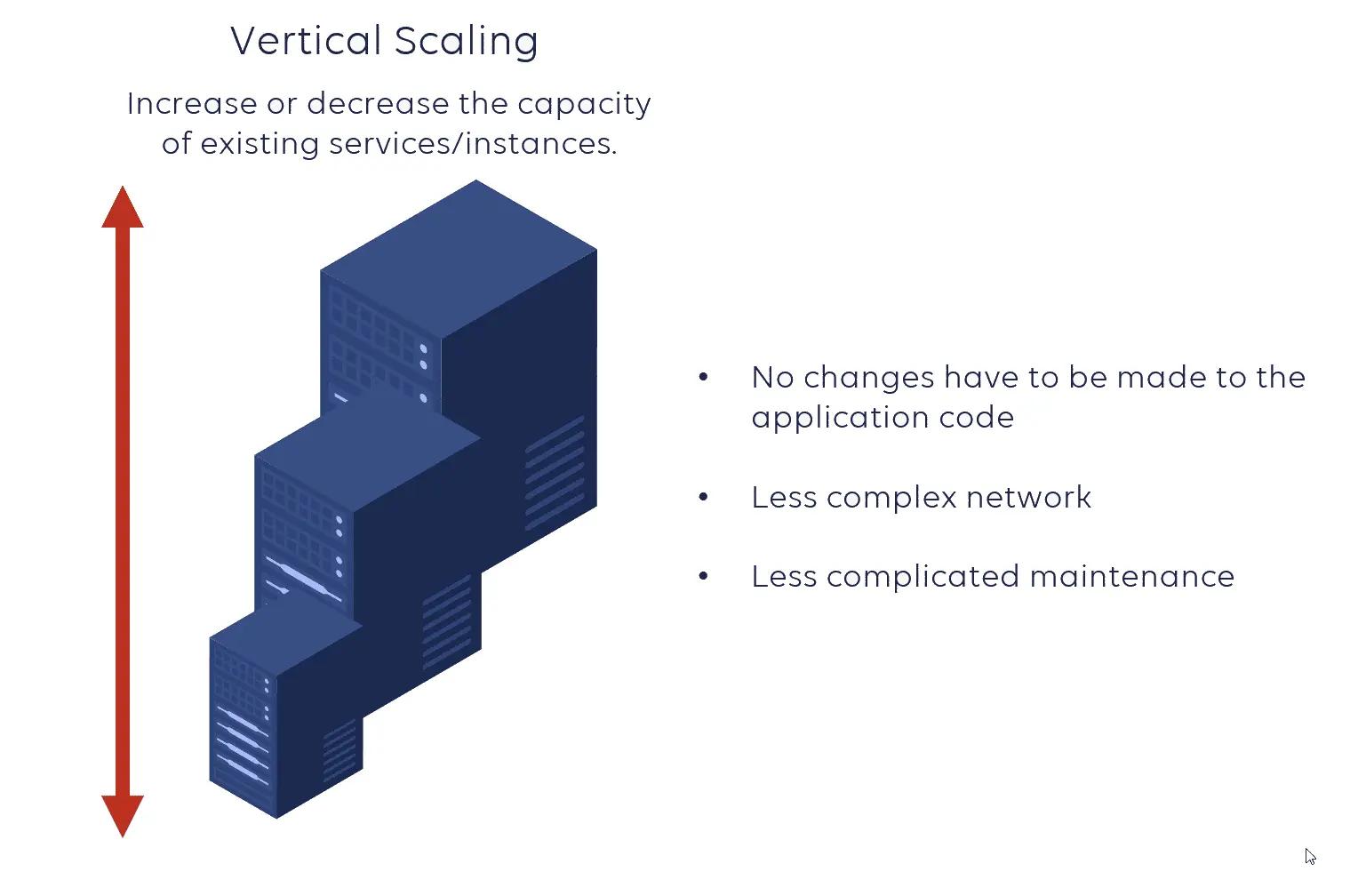
Vertical scaling means:
Instead of adding more servers, you upgrade the current one.
You can increase:
CPU power
RAM
SSD storage
GPU resources
Network speed
Simple Example
Suppose your server currently has:
2 CPU cores
4GB RAM
Your application starts getting more traffic.
You upgrade the server to:
16 CPU cores
64GB RAM
This is vertical scaling.
Why Vertical Scaling is Important
Vertical scaling allows developers to improve application performance efficiently without deploying additional servers.
This approach is especially useful when:
Applications are small or medium-sized
Infrastructure simplicity matters
Teams are small
Budget is limited initially
In cloud computing, vertical scaling is often combined with auto-scaling capabilities that dynamically increase or decrease resources based on workload.
Advantages of Vertical Scaling
1. Simpler Architecture
Everything runs on a single machine.
You avoid complexity like:
Load balancing
Distributed systems
Inter-server communication
2. Easier Management
You manage:
One operating system
One database server
One deployment environment
Perfect for startups and beginner developers.
3. Faster Internal Communication
Processes communicate locally within the same server.
This reduces network overhead.
4. Better Resource Utilization
Upgrading specific components often improves performance without rebuilding the entire infrastructure.
For example:
Upgrading only the database server
Increasing RAM for caching
Adding faster SSD storage
Drawbacks of Vertical Scaling
1. Hardware Limits
A server cannot grow forever.
Eventually you reach maximum:
CPU
Memory
Storage capacity
2. Single Point of Failure
If the server crashes:
Entire application becomes unavailable
3. Expensive at Large Scale
Enterprise-grade machines become extremely expensive.
Example:
Small VM → affordable
High-memory enterprise server → costly
4. Increasing Complexity
As components become more powerful, system management can become harder.
Cloud Providers Supporting Vertical Scaling
Major cloud providers support vertical scaling:
AWS allows upgrading EC2 instances by increasing CPU, RAM, and storage resources. Google Cloud lets users resize Compute Engine machine types dynamically. Azure supports VM resizing and autoscaling based on workload demand.
What is Horizontal Scaling?
Horizontal scaling means:
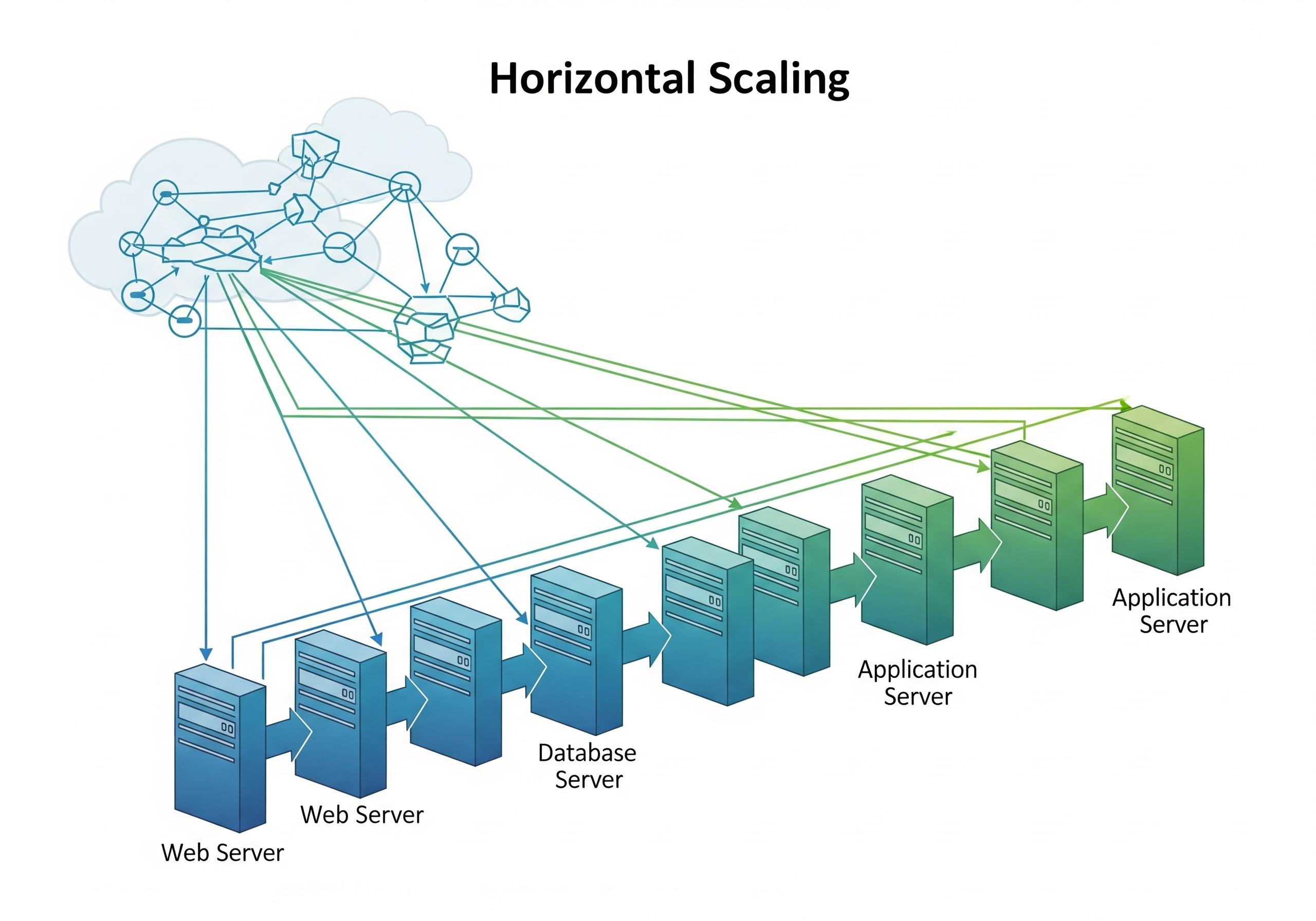
Instead of making one machine stronger, you add multiple machines.
Example
Instead of upgrading one server, you create:
A load balancer distributes traffic among them.
Horizontal Scaling Architecture
Why Horizontal Scaling Matters
Horizontal scaling is ideal for applications with massive traffic growth.
Examples include:
Social media
Streaming services
E-commerce platforms
SaaS applications
AI systems
Imagine a shopping website during Black Friday sales. Traffic suddenly increases. Instead of upgrading one server, the platform launches additional servers to share the workload.
Advantages of Horizontal Scaling
1. Better Scalability
You can continue adding servers almost indefinitely. Perfect for rapidly growing platforms.
2. High Availability
If one server fails:
This improves uptime significantly.
3. Flexibility
Horizontal scaling adapts quickly to changing demand.
4. Cost Efficiency at Large Scale
Adding smaller servers is often cheaper than upgrading massive enterprise hardware.
5. Easier Redundancy
Load balancing and failover strategies become easier.
Drawbacks of Horizontal Scaling
1. More Complex Infrastructure
ou may need:
Load balancers
Shared databases
Distributed caching
Replication systems
2. Resource Coordination Problems
Servers must synchronize data correctly.
3. Higher Operational Complexity
Managing many machines increases:
Monitoring complexity
Deployment complexity
Debugging difficulty
4. Increased Infrastructure Costs
More servers mean:
More networking
More monitoring
More cloud billing
Especially in cloud environments.
Real-World Example of Horizontal Scaling
Amazon uses horizontal scaling heavily during Black Friday. Millions of users access the platform simultaneously. Traffic gets distributed across multiple servers using load balancers.
Similarly, Netflix horizontally scales to support millions of concurrent streams worldwide.
Vertical vs Horizontal Scaling Comparison
Feature | Vertical Scaling | Horizontal Scaling |
|---|---|---|
Method | Upgrade one server | Add multiple servers |
Complexity | Simple | Complex |
Fault tolerance | Low | High |
Performance limit | Hardware limited | Nearly unlimited |
Cost at small scale | Lower | Higher |
Cost at large scale | Very expensive | More efficient |
Best use case | Small apps | Large cloud systems |
Availability | Lower | Higher |
Code Example — Vertical Scaling
Simple Node.js Server
const express = require("express");

const app = express();

app.get("/", (req, res) => {
    res.send("Application Running");
});

app.listen(3000, () => {
    console.log("Server started on port 3000");
});
This application runs on one server.
To vertically scale it:
Upgrade RAM
Increase CPU
Use a larger cloud instance
Code Example — Horizontal Scaling with Node.js Cluster
const cluster = require("cluster");
const os = require("os");
const express = require("express");

if (cluster.isMaster) {

    const cpuCount = os.cpus().length;

    for (let i = 0; i < cpuCount; i++) {
        cluster.fork();
    }

} else {

    const app = express();

    app.get("/", (req, res) => {
        res.send(`Handled by process ${process.pid}`);
    });

    app.listen(3000);
}
This creates multiple worker processes. Traffic gets distributed across CPU cores.
Nginx Load Balancer Example
http {

    upstream backend {

        server app1:3000;
        server app2:3000;
        server app3:3000;
    }

    server {

        listen 80;

        location / {
            proxy_pass http://backend;
        }
    }
}
This distributes requests across multiple servers.
Kubernetes Horizontal Scaling Example
Modern cloud-native systems commonly use:
Containers
Kubernetes
Auto-scaling
Kubernetes supports automatic horizontal scaling.
Kubernetes Scaling Command
kubectl scale deployment/myapp --replicas=5This increases the deployment replicas to 5.
Kubernetes Horizontal Pod Autoscaler
apiVersion: autoscaling/v2
kind: HorizontalPodAutoscaler

metadata:
  name: myapp

spec:
  scaleTargetRef:
    apiVersion: apps/v1
    kind: Deployment
    name: myapp

  minReplicas: 2
  maxReplicas: 10

  metrics:
  - type: Resource
    resource:
      name: cpu
      target:
        type: Utilization
        averageUtilization: 70
This automatically creates more pods when CPU usage increases.
Choosing the Right Scaling Strategy
Choosing the correct strategy depends on:
Budget
Traffic patterns
Team expertise
Application architecture
Performance requirements
When to Use Vertical Scaling
Use vertical scaling when:
Building MVPs
Running internal company tools
Managing smaller applications
Working with predictable traffic
Keeping architecture simple
When to Use Horizontal Scaling
Use horizontal scaling when:
Expecting rapid growth
Building SaaS platforms
Running cloud-native applications
Handling millions of users
Needing high availability
Hybrid Scaling Strategy
Most modern systems use both approaches together.
Example:
Vertically scale databases initially
Horizontally scale application servers
This provides:
Better reliability
Cost optimization
Easier growth